Tips to Improve Connectivity and Performance of Networks on Smart Devices
Impact of Network Reliability on Smart Devices
In the modern era, smart devices have seamlessly integrated into our daily lives, enhancing convenience and efficiency in ways previously unimaginable. However, the seamless operation of these devices relies heavily on network connectivity. A stable connection is essential not just for convenience, but for the overall functionality of smart appliances ranging from voice-activated assistants and security systems to home automation technology.
Factors Influencing Network Performance
The performance of your network can vary significantly based on several critical factors:
- Signal strength and range: The strength of the Wi-Fi signal can directly affect the performance of smart devices. For instance, a weak signal in a remote corner of the house might cause your smart doorbell camera to lag or even disconnect.
- Network congestion: In households with multiple smart devices, bandwidth competition can lead to delays and interruptions. For example, streaming a movie while someone else is gaming can diminish the experience for both users due to shared bandwidth limitations.
- Interference from other devices: Microwaves, cordless phones, and even Bluetooth devices can interfere with Wi-Fi signals, particularly on the crowded 2.4 GHz frequency band. An increase in interference can result in slower speeds and weaker connections.
- Router configuration: A well-configured router can enhance network performance. Settings such as Quality of Service (QoS), which prioritizes specific traffic, can improve the experience for high-demand activities like video streaming.
Strategies for Enhancing Connectivity
Improving network performance for smart devices is achievable with a few practical strategies. Here are some essential tips:
- Upgrade your router hardware: Investing in a modern router can dramatically boost your network’s reliability. Newer routers often support advanced technologies like beamforming and MU-MIMO, which help in efficiently managing the connections to multiple devices.
- Utilize dual-band or tri-band options: Modern routers typically offer dual-band (2.4GHz and 5GHz) or tri-band capabilities, allowing users to better distribute their devices over different frequencies, ultimately reducing congestion.
- Minimize physical obstructions: Walls, furniture, and appliances can hinder wireless signals. Consider placing the router in a central location in your home to maximize coverage.
- Regularly update firmware: Keeping your router’s firmware up to date can patch security vulnerabilities and ensure optimal performance. Manufacturers often release updates that enhance the router’s capability and stability.
By applying these strategies, individuals can significantly enhance their connectivity, resulting in smoother operations of their smart devices. Furthermore, as technological advancements continue, staying informed about new solutions will foster a more efficient and enjoyable smart-home experience. Embracing reliable network infrastructure is not merely a luxury—it is a necessity in today’s digitally interconnected landscape.
DISCOVER MORE: Click here for insights on usability testing
Enhancing Your Smart Device Network Performance
In today’s digital landscape, the seamless integration of smart devices into our homes and workplaces has transformed how we live and interact with technology. From smart thermostats that learn your heating preferences to advanced security systems that monitor your property around the clock, these devices can enhance convenience, efficiency, and security. However, their functionality is heavily reliant on a robust and efficient network. As the number of connected devices continues to grow, ensuring that your connectivity remains strong and reliable is paramount.
Assessing Your Current Network Setup
Understanding your current network setup is the first step toward optimizing performance. A thorough evaluation can reveal bottlenecks or areas needing improvement. Here are vital steps to take:
- Conduct a speed test: This simple action can reveal the disparity between your expected and actual internet speed. Services like Ookla’s Speedtest or Fast.com allow you to determine if your network can adequately support multiple devices. If you’re consistently far below your subscription speed, it may be time to contact your internet service provider (ISP) for a potential upgrade.
- Check device placement: The physical arrangement of your router and connected devices plays a crucial role in performance. Walls, furniture, and even appliances can obstruct signals. Ideally, place your router in a central location within your home and elevate it off the ground if possible. This can help ensure that every corner of your space receives a strong signal.
- Evaluate device counts: The proliferation of smart devices—ranging from Wi-Fi-enabled light bulbs to home assistants—can lead to network congestion. You may want to consider which devices you truly need on your network versus those that could be connected intermittently. Reducing the number of simultaneously active devices can help prioritize bandwidth allocation, making your critical devices run more smoothly.
With this assessment, you can move on to implementing specific strategies to enhance your network’s performance.
Implement Networking Best Practices
- Consider a mesh networking system: If you reside in a larger home or a multi-story building, conventional routers may struggle to provide reliable coverage. A mesh networking system, composed of multiple interconnected nodes, can effectively eliminate dead spots and ensure uniform Wi-Fi coverage throughout your space. Popular systems like Google Nest Wi-Fi or Eero have garnered positive reviews for their user-friendly setup and performance.
- Utilize wired connections where possible: For devices that require a stable connection—such as streaming devices or gaming consoles—opting for Ethernet cables can dramatically improve reliability. Unlike Wi-Fi, Ethernet connections are less susceptible to interference and provide faster speeds, allowing for a smoother user experience.
- Prioritize devices: Leveraging your router’s Quality of Service (QoS) settings can be a game-changer. By prioritizing bandwidth for specific devices, such as those needed for work calls or streaming, you can minimize lag and buffering. This is particularly beneficial during peak hours when multiple users may be online concurrently.
Implementing these networking best practices can lay a strong foundation for your smart devices, ensuring they operate efficiently and effectively. As technology continues to evolve, staying proactive in managing your network will be essential in adapting to new challenges. This proactive approach ensures that smart technology enhances your lifestyle while avoiding the disruptions that come with connectivity issues.
Enhancing Network Connectivity and Performance
As we delve deeper into the digital age, it becomes increasingly vital to maintain a robust network connection for our smart devices. In this section, we will explore practical strategies to amplify your connectivity and optimize the performance of your devices.
One of the most effective ways to enhance wifi signals is by positioning your router in a strategic location within your home or office. Ideally, placing the router in a central area away from electronic interference can drastically improve connectivity. Furthermore, using a dual-band router allows you to segregate connected devices by frequency, thereby reducing congestion and improving speed.
Another noteworthy method is to regularly update the firmware on your router and smart devices. Manufacturers frequently release updates that contain fixes for performance issues and security vulnerabilities. Ensuring your devices are running the latest software will not only enhance functionality but also provide better connectivity.
Moreover, incorporating network extenders or mesh systems can further eliminate dead zones and provide seamless coverage throughout your premises. By effectively distributing your internet connection across multiple access points, you create a unified network that can significantly reduce latency and buffering during high data usage. Lastly, keep an eye on the number of connected devices; excessive connections can lead to diminishing speeds and performance, so managing and optimizing your device usage is crucial.
| Category | Details |
|---|---|
| Router Placement | Positioning the router centrally can boost signal strength. |
| Firmware Updates | Keeping devices updated ensures optimal performance and security. |
| Mesh Systems | Implementing mesh networks eliminates dead zones. |
| Device Management | Optimizing the number of connected devices enhances speed. |
By implementing these tips, you can significantly improve the connectivity and performance of your smart devices, paving the way for a more reliable and efficient digital experience. Stay tuned as we continue to explore more advanced topics on this subject!
DISCOVER MORE: Click here to learn how to conduct effective usability testing
Optimizing Your Wi-Fi Environment
While implementing networking best practices is crucial, the overall Wi-Fi environment greatly influences the performance of your smart devices. Understanding how to optimize your Wi-Fi can lead to enhancements that elevate your connected experience. Here are essential elements to consider as you refine your network:
Tune Your Wi-Fi Settings
- Choose the right frequency band: Most modern routers operate on two frequency bands, 2.4 GHz and 5 GHz. The 2.4 GHz band offers a broader range, making it suitable for devices further away from the router, while the 5 GHz band generally provides faster speeds but has a shorter range. Assess your devices and prioritize which band to use based on their location and bandwidth needs.
- Update firmware regularly: Router manufacturers frequently release firmware updates to improve performance, security, and features. Regularly checking for and applying these updates can optimize your router’s functionality. In some cases, automating these updates through the router’s settings can ensure your system is always up to date without additional effort.
- Change your Wi-Fi channel: In densely populated areas, overlapping Wi-Fi channels can lead to interference, slowing down your connectivity. Utilizing apps such as Wi-Fi Analyzer or NetSpot can help you detect the least congested channels. Switching to a less crowded channel can alleviate interference and improve your network’s performance significantly.
Enhancing Your Smart Device Configuration
Beyond network settings, the configuration of your smart devices can greatly affect overall connectivity:
- Keep firmware updated: Just as with routers, ensuring that your smart devices are regularly updated can enhance their functionality and security. Most devices provide notifications for available updates, so taking advantage of these can result in better performance and improved features.
- Disconnect unused devices: Regularly reviewing connected devices and disconnecting those no longer in use can free up bandwidth, enhancing the performance of your essential smart devices. Occasionally checking your router’s interface to see connected devices can help maintain a streamlined network.
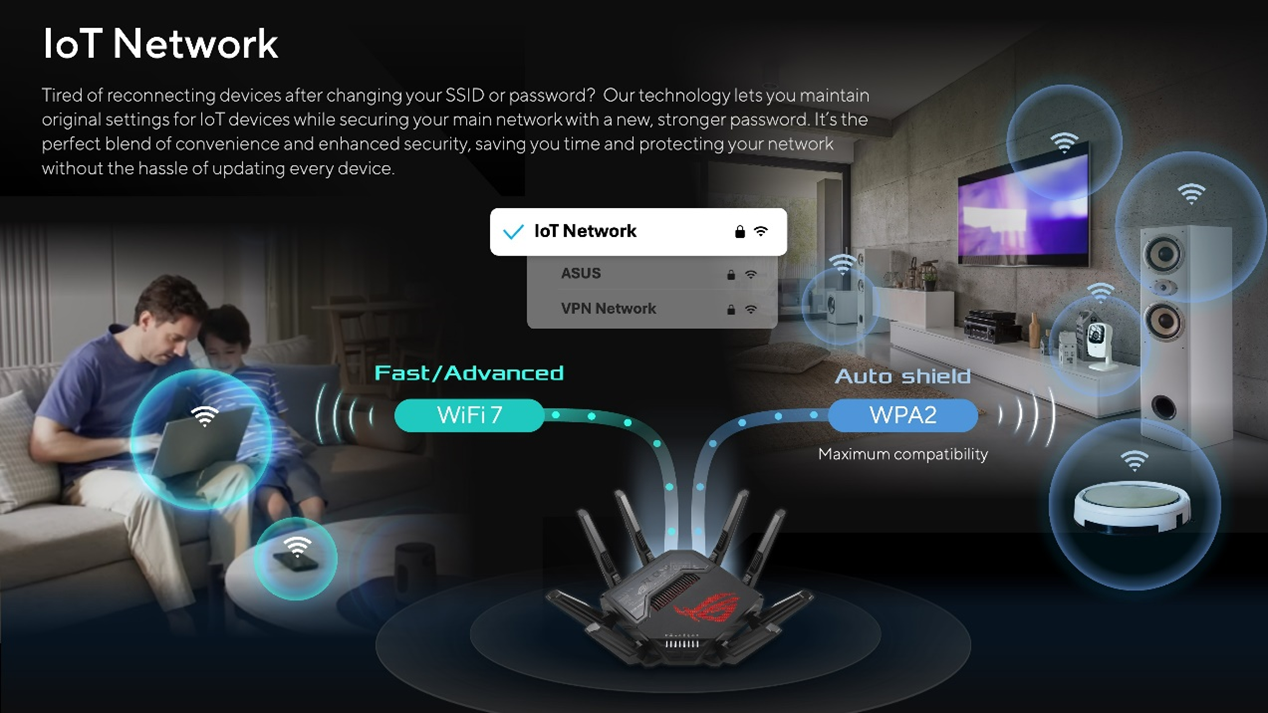
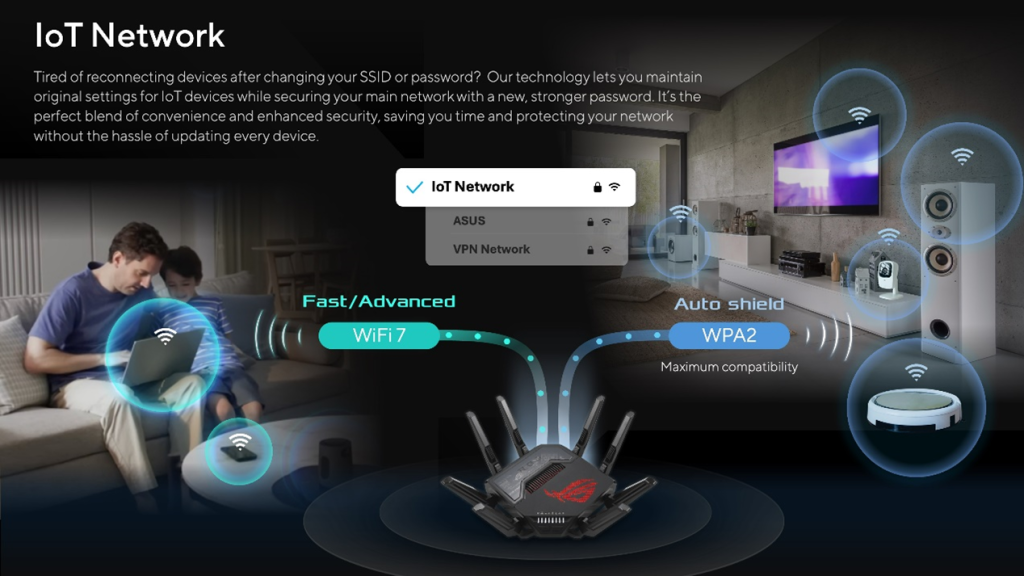
- Segmentation of networks: For advanced users, creating separate networks for different device categories—like personal devices and smart home devices—can prevent bandwidth congestion. This is particularly useful if you have a home office where stable connections are mandatory for video calls and file transfers.
Consider Advanced Technology Solutions
As home networking technology continues to evolve, more advanced solutions are becoming increasingly accessible:
- Wi-Fi 6 Technology: Upgrading to a Wi-Fi 6 router can significantly enhance performance, especially in households with numerous connected devices. It offers improved data rates, increased capacity, and better performance in high-demand situations through advanced features like Orthogonal Frequency Division Multiple Access (OFDMA).
- Powerline adapters: In situations where Wi-Fi coverage is limited, powerline adapters can use existing electrical wiring to create a wired network connection in any room. This option can be especially useful in homes where Wi-Fi signals struggle to reach certain areas.
- Smart Home Hubs: Utilizing smart home hubs can centralize device management and reduce strain on your network. By connecting compatible smart devices to a hub, they can communicate efficiently without overloading your main Wi-Fi network.
By implementing these techniques to optimize your Wi-Fi environment, you can enhance connectivity and boost the performance of your smart devices significantly. Remember that a little attention can go a long way in enjoying a seamless smart home experience.
DISCOVER MORE: Click here to learn about effective usability testing
Conclusion
In today’s world, the proliferation of smart devices has transformed our living and working environments, making effective network connectivity essential. As highlighted throughout this article, there are a multitude of techniques and strategies to enhance the performance and reliability of your home network. From optimizing Wi-Fi settings such as choosing the right frequency bands to regularly updating firmware, every little adjustment contributes significantly to your network’s efficiency. Furthermore, the strategic configuration of your smart devices—including keeping them updated and disconnecting unused ones—ensures that your bandwidth is utilized effectively.
Additionally, embracing advanced technology solutions such as Wi-Fi 6 routers and powerline adapters enables you to stay ahead of connectivity challenges. These innovations not only offer faster data rates but also expand the range of your network, catering to the demands of a modern smart home. As we navigate this digital landscape, investing time in these practices can lead to smoother interactions between devices, ultimately enriching your everyday experiences.
In conclusion, the world of smart technology is ever-evolving, and so should your approach to maintaining optimal connectivity. By applying these tips to improve connectivity and performance, you can enjoy a more robust and dependable network that supports your smart devices seamlessly. Take the initiative today, and transform your home into a hub of digital efficiency.

Beatriz Johnson is a seasoned tech writer and digital tools expert with a passion for simplifying the complexities of technology and mobile applications. With over a decade of experience in the tech industry, she specializes in topics like productivity apps, software reviews, and emerging digital trends. Through her work, Beatriz empowers readers to make informed technology choices and stay ahead in the ever-changing world of apps and innovation.