
How to Customize Hardware Settings to Improve Your Device’s Performance
Unlock Your Device’s Full Potential
Every electronic device, be it a laptop, smartphone, or even a tablet, has a set of hardware settings that can significantly influence its performance. Customizing these settings can lead to enhanced speed, improved responsiveness, and a smoother overall user experience. Understanding how to manipulate these options is vital for anyone looking to optimize their technology investment.
Here are some key areas to consider when adjusting your hardware settings:
- Processor Settings: Overclocking your CPU can yield higher speeds. Overclocking allows you to push your processor beyond its factory settings, giving your device a performance boost ideal for gaming or demanding applications. However, this requires careful consideration of cooling solutions to prevent overheating.
- Graphics Configuration: Fine-tuning GPU settings can enhance visual performance in games and applications. By adjusting parameters such as resolution and texture quality, you can achieve a more immersive experience. Gamers often benefit from optimizing their graphics settings to strike a balance between stunning visuals and frame rates, which can significantly impact gameplay.
- Power Management: Adjusting power settings can effectively balance performance and battery life. Many devices come with different power profiles such as “High Performance,” “Balanced,” and “Power Saver.” Customizing these settings can help users manage how their device consumes power, which is crucial for laptops and mobile devices where battery life is a priority.
- Storage Optimization: Configuring your hard drive or SSD settings can reduce load times. Tools like disk defragmenters for HDDs or adjusting the settings for TRIM on SSDs can significantly enhance data retrieval speeds. Additionally, ensuring that your storage is not nearing its capacity can prevent slowdowns and maintain optimal performance.
While hardware customization might sound intimidating, it can yield impressive results. For example, savvy gamers often overclock their graphics cards to achieve higher frame rates and smoother graphics in titles like “Call of Duty” or “Cyberpunk 2077.” Similarly, professionals engaged in video editing or 3D modeling can customize their setups for reliable multitasking, elevating their productivity significantly.
Dive deeper into the world of hardware settings and discover how these adjustments can transform your device’s functionality. Resources such as tech forums, online tutorials, and manufacturer specifications can provide valuable insights into the best practices for customizing your devices. With a little research and willingness to experiment, the potential to unlock your device’s performance is well within reach.
DISCOVER MORE: Click here to learn how psychology enhances user experiences
Exploring Key Areas for Optimization
Customizing hardware settings can unlock remarkable potential in your devices, but it’s essential to start with a clear understanding of the specific areas that warrant your attention. To navigate this optimization journey successfully, consider focusing on these critical components:
- RAM Management: Your device’s Random Access Memory (RAM) plays a vital role in determining how efficiently it handles multiple tasks simultaneously. Upgrading your RAM or altering its settings in the BIOS can provide immediate benefits in terms of speed and responsiveness. For instance, allocating additional RAM to resource-heavy applications can significantly improve performance, especially for creative processes like video editing or graphic design.
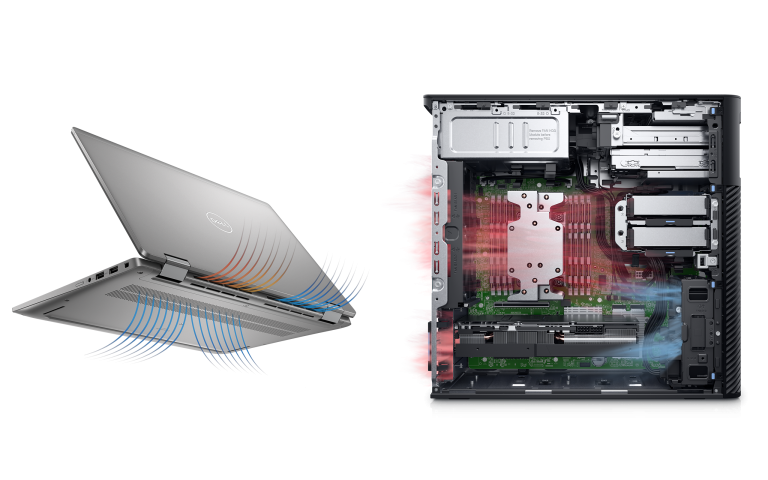
- Cooling System Configuration: Maintaining optimal temperatures is crucial for performance. If your device tends to overheat, consider adjusting the fan settings or optimizing airflow within the chassis. Many devices have manufacturer-recommended cooling profiles, but tools like SpeedFan can empower users with further control. Effective cooling not only prolongs the lifespan of components but also enhances performance stability, allowing you to push your device’s capabilities further.
- BIOS Settings: The Basic Input/Output System (BIOS) is a software layer that initializes hardware during the boot process. Adjusting BIOS settings can enable features like virtualization, or even modify boot priorities for faster startups. Some users may also benefit from updating their BIOS to the latest version, which can introduce performance patches and revised settings that optimize hardware functionality. Consult manufacturer documentation before making any changes to avoid unintentional issues.
- Network Configuration: If you frequently engage in online activities, optimizing your network settings can lead to faster and more stable connections. Adjusting Quality of Service (QoS) settings enables prioritization for specific applications, ensuring a smooth video call or lag-free gaming experience. Additionally, switching from a 2.4 GHz to a 5 GHz Wi-Fi connection can reduce interference and enhance speed, particularly in densely populated areas.
As you explore these areas, remember that the effectiveness of customization can vary from device to device. For tech enthusiasts, resources such as Tom’s Hardware and user forums like Reddit’s BuildAPC community offer invaluable insights into specific hardware configurations. With a proactive approach and a willingness to experiment, you have the potential to release an untapped reservoir of performance, taking your computing experience to new heights.
As you delve into the world of hardware customization, consider documenting your adjustments. This practice not only helps track changes but also allows you to revert to previous configurations if something goes awry. Start scrutinizing your device’s specific hardware settings, and witness the transformative effects on its performance firsthand.
| Category | Details |
|---|---|
| Overclocking | Increase CPU/GPU performance by adjusting clock speeds for enhanced efficacy. |
| Power Management Settings | Optimize energy usage, balancing performance and battery life for sustained operation. |
To delve deeper into the mechanisms of customizing hardware settings, consider the practice of overclocking. This technique allows users to push their CPU or GPU beyond its factory-set limits, achieving notable improvements in performance, especially during resource-intensive tasks like gaming or video editing. However, it is essential to monitor temperatures and ensure adequate cooling to prevent hardware damage.Additionally, adjusting power management settings can lead to significant performance gains. By customizing these settings, users can effectively tailor their devices to either favor performance or battery conservation, creating a balance that suits their specific usage scenarios. By actively engaging with these settings, users can experience smoother multitasking and faster load times, ultimately enhancing their overall user experience. Exploring these options can lead to remarkable improvements in performance, making it worthwhile for enthusiasts and everyday users alike to investigate further.
DISCOVER MORE: Click here to dive deeper
Diving Deeper into Customization Techniques
After examining fundamental areas for hardware optimization, it’s time to dive deeper into advanced customization techniques that further enhance your device’s performance. Each of these techniques can offer a unique advantage, optimizing not only speed but also energy efficiency, which is crucial for mobile devices and laptops.
- Overclocking: Many users have experienced significant performance gains through the practice of overclocking. This technique involves increasing the clock speed of your CPU or GPU beyond the manufacturer’s predefined settings. While this increases performance, it may also generate excess heat, so proper cooling is essential. Utilize tools such as MSI Afterburner for graphics cards or Intel XTU for CPUs to fine-tune your settings gradually, ensuring stability at every step. Remember: overclocking can void your warranty, so proceed with caution!
- SSD Optimization: If your device employs a Solid State Drive (SSD), there are several optimizations to consider. Enabling TRIM can help maintain the performance of your SSD over time by allowing the operating system to inform the SSD which data is no longer in use. Additionally, consider disabling hibernation and reducing the size of your page file, as these can unnecessarily use SSD space and reduce operational speed. Utilize tools like CrystalDiskInfo to monitor and manage your SSD health effectively.
- Power Settings Adjustment: Many devices ship with preconfigured power settings that prioritize battery life over performance. By shifting your power plan to “High Performance” in the Control Panel (for Windows users) or adjusting energy settings on your Mac, you can leverage your hardware’s full capabilities. This adjustment often provides noticeable boosts during demanding tasks, from gaming to video editing.
- Peripheral Optimization: Devices and peripherals play a significant role in overall performance. For gamers, adjusting DPI settings on a mouse or refresh rates on monitors can provide a more responsive experience. Similarly, optimizing keyboard macros can enhance productivity in software like Microsoft Office or Adobe Creative Suite. Additionally, consider updating firmware for peripherals to improve compatibility and performance.
One must not overlook the importance of regular updates in the quest for optimal performance. Keeping your operating system and software up to date ensures that you benefit from security patches and performance improvements. Many software developers regularly release updates that enhance compatibility with hardware, ensuring that your device operates at peak efficiency.
Lastly, it’s essential to monitor your progress through benchmarking tools such as UserBenchmark or Geekbench. These tools provide a comparative analysis of your device’s performance before and after adjustments, allowing you to understand the impact of your changes accurately. With these insights, you can make informed choices on both essential and advanced customizations to enhance your device significantly.
Venturing into the realm of hardware configuration can be immensely rewarding. Each adjustment leads you one step closer to maximizing your device’s potential, whether for casual use, intense gaming, or professional projects. By adopting a strategic mindset and a continual learning approach, you can ensure that your device remains responsive and capable of meeting your evolving needs.
DISCOVER MORE: Click here to learn how to streamline your tasks
Conclusion
In today’s fast-paced digital world, ensuring your device runs at optimal performance is not merely a luxury but a necessity. By learning how to customize hardware settings effectively, you can unlock the full potential of your device, whether it’s a desktop, laptop, or mobile gadget. From overclocking your CPU and GPU to utilizing SSD optimization techniques, every adjustment made can translate into meaningful performance gains. It’s essential to find a balance between power, efficiency, and heat management to maintain device longevity.
The impact of power settings and peripheral optimization also cannot be overlooked. Simple changes, like switching to a “High Performance” power plan or adjusting the DPI of your gaming mouse, can significantly enhance your user experience. Furthermore, remaining vigilant about software updates not only secures your system but also provides vital performance enhancements that keep pace with evolving hardware capabilities.
Ultimately, the journey of customizing hardware settings is an ongoing one. Utilizing benchmarking tools gives you insight into the effects of these adjustments, allowing for informed and iterative improvements. As you engage in this continuous learning process, you will not only enhance your device’s performance but also increase your tech-savvy, empowering you to tackle future challenges with confidence. Dive into experimenting with your settings, stay curious, and watch as your device transforms into a powerhouse tailored to your unique needs.