How to Adjust Privacy Settings to Improve Device Performance
Privacy Settings: Your Key to Enhanced Device Performance
In a world where technology permeates every aspect of our lives, we often take the performance of our devices for granted. Yet, many users are unaware that the privacy settings on their smartphones, tablets, and computers play a crucial role in maintaining not just security, but also efficiency. By adjusting these settings, individuals can optimize their devices significantly, merging safety and speed in ways they might not have realized were possible.
Let’s explore some of the critical benefits that come from managing your privacy settings, transforming your device’s performance in the process:
- Reduced Background Processes: Many applications continuously run in the background, consuming precious processing power. By limiting their capability to operate behind the scenes—often through adjusting app permissions—you allow your device to allocate resources more efficiently. For instance, consider settings that restrict social media or streaming apps from refreshing when they are not in use. This simple shift can dramatically decrease CPU load.
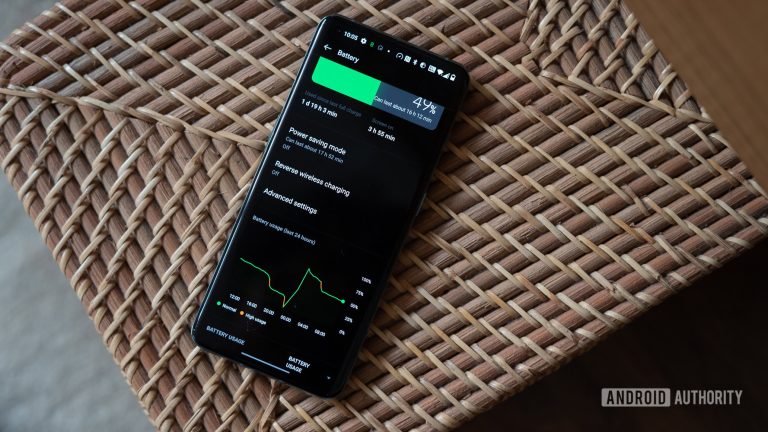
- Improved Battery Life: A major pain point for mobile device users is battery drain. Often, location services and app permissions are set too liberally, leading to a quicker depletion of battery life. By navigating to your device settings and disabling unnecessary geolocation tracking for apps, as well as turning off location services when not needed, you might find yourself enjoying longer usage times without constantly reaching for a charger.
- Faster Load Times: Many people experience frustration with slow app load times. An often-overlooked fix involves cleaning up accumulated data and limiting tracking functionalities that slow down performance. For instance, by routinely clearing your browser’s cache or disabling ad trackers in your settings, you can enhance your device’s speed, ensuring a more responsive and pleasant user experience.
In our increasingly interconnected lives, it becomes essential to strike the right balance between protecting our personal information and ensuring our devices perform optimally. Small tweaks to your privacy settings can lead to noticeable improvements in device responsiveness, making mundane tasks feel effortlessly swift.
As we dissect the various privacy and performance aspects, you will learn practical steps and discover essential insights that empower you to control your digital environment. By embracing these strategies, you not only secure your personal data but also revitalize your overall device experience. Stay tuned as we embark on this investigative journey, unveiling the potential of privacy management in the realm of technology.
DIVE DEEPER: Click here to learn how to conduct effective usability testing

Unlocking Performance Through Targeted Privacy Adjustments
To truly harness the power of your device, it’s important to understand how privacy settings can have a direct impact on performance. As technology becomes an integral part of our daily routines, the need to strike a balance between personal data security and device efficiency is more vital than ever. Implementing targeted adjustments to privacy settings not only safeguards your information but can also yield remarkable enhancements in the way your hardware operates.
One of the first areas to consider is your application permissions. Many users unwittingly grant extensive permissions to apps, allowing them to access location services, background data, and notifications without a second thought. By carefully reviewing permissions and removing unnecessary access, users can effectively minimize resource consumption. This not only frees up memory but also allows your device to speed up processing times, making your overall experience smoother. Here are a few key permissions to examine:
- Location Services: Disable location access for apps that don’t require it, such as games or non-navigation-related tools. Keeping GPS off when not needed is essential for maintaining device performance.
- Background App Refresh: Limit apps from refreshing content in the background. This setting is particularly beneficial for social media and news applications, which can drain resources if left unchecked.
- Notifications: Review which apps send you notifications and consider turning off alerts from those that aren’t essential. This will drastically reduce background activity that can slow your device.
Another crucial consideration is the management of data tracking. Many applications and websites track user behavior, which not only raises privacy concerns but can also bog down device performance through excessive data accumulation. By adjusting your browser settings to block third-party cookies and disabling trackers, you not only enhance your privacy but can also boost load speeds and overall responsiveness. Regularly clearing cache and cookies can also enhance app performance, helping to combat sluggishness.
Moreover, don’t overlook the significance of operating system updates. While avoiding updates might seem like a way to save time, it can actually hinder your device’s performance and expose you to security risks. Keeping your operating system up-to-date ensures you have the latest privacy features and performance improvements, enabling smoother operation across all applications.
Thus, being proactive in reviewing and adjusting your privacy settings can unlock enhanced capabilities within your devices. As you delve deeper into these adjustments, you will find that the benefits extend beyond just security, potentially reviving even older devices and improving their usability. The next section will provide further insights on how specific settings can elevate your experience, ensuring you can navigate your tech world seamlessly.
Adjusting Privacy Settings for Optimal Device Performance
Adjusting the privacy settings on your device is not just about safeguarding your personal information; it can significantly enhance your device’s performance. Here are a few critical areas to explore:
| Category | Description |
|---|---|
| Data Usage Management | Limit background data usage by apps to free up resources |
| Location Settings | Adjusting location permissions to only necessary apps increases battery life |
By managing data usage and location settings, you help your device allocate more resources to critical tasks. This optimization not only boosts speed but also prolongs battery life, giving you a smoother experience overall. Furthermore, restricting background activities for unneeded apps can lead to noticeable improvements in your device’s responsiveness. Consider regularly reviewing these privacy settings to ensure they align with your current usage patterns. Learning how to effectively navigate these options allows you to enhance both privacy and performance, making it a wise investment of your time.
DIVE DEEPER: Click here to learn how to conduct effective usability testing
Optimizing Device Performance with Advanced Privacy Settings
In addition to managing application permissions and data tracking, users should also pay close attention to how cloud storage and synchronization settings can impact device performance. Many smartphones and tablets automatically sync photos, documents, and other files to the cloud. While this feature provides convenience and backup options, it can also create unnecessary strain on your device’s resources.
To optimize your performance, consider adjusting your sync settings. For instance, you may not need to back up every photo or file immediately. By changing the sync frequency or opting for manual synchronization, you can significantly reduce the load on your device’s background processes. Moreover, disabling automatic sync for apps that don’t require real-time updates will help maintain responsiveness, particularly during high-demand activities such as gaming or streaming.
Another key area to explore is advertising settings. Devices often come pre-installed with tracking features for targeted advertising. These trackers not only raise privacy issues but also contribute to device sluggishness as they consume resources for collecting data. Users can enhance performance by opting out of personalized ads and limiting ad tracking within their device settings. This can usually be found in the privacy or security option of your device, under a tab like “Ad Preferences.” By making these adjustments, not only do you augment your privacy, but you also streamline your device’s operations.
Updating and managing your antivirus and security apps is another step toward optimal performance. While these applications are essential for protecting your device from malware, having too many running simultaneously can appear counterproductive by exhausting your system’s resources. Evaluate if you need multiple security tools or if one comprehensive app can fulfill your security requirements. Regularly updating these security measures will ensure they operate efficiently and effectively, enabling your device to handle threats without sacrificing performance.
Furthermore, the oversight of social media settings is often overlooked in the pursuit of performance. Social media apps are notorious for consuming bandwidth and battery life due to continuous notifications and background activity. Consider adjusting the notifications settings and limiting which apps have location access. Additionally, delete unused social media applications from your device to enhance promptness, as even uninstalled apps often leave behind residual files that can diminish performance.
Don’t forget about device storage management. Many devices come equipped with storage optimization features that help manage how much data is stored on your device. Regularly remove unused apps, duplicate photos, or cached data that can clog up your system. Setting up a routine storage audit can prevent unwanted sluggishness and keep your device running at its peak capability.
In summary, adjusting advanced privacy settings such as sync preferences, advertisement trackers, and storage capabilities can make a substantial difference in your device’s performance. By taking the time to delve into these settings, users can enjoy a more secure and efficient technology experience, transforming how they interact with their devices in everyday life.
DISCOVER MORE: Click here for essential usability testing tips
Conclusion: Unlocking Performance and Privacy
The interplay between privacy settings and device performance is crucial for enhancing your technological experience. As we’ve explored, taking the time to tailor settings like cloud synchronization, advertising preferences, and antivirus management can lead to a noticeable improvement in how swiftly and smoothly your device operates. Not only does this allow for a more streamlined performance, but it also significantly amplifies your privacy, ensuring your data is not just secure but also treated with the respect it deserves.
Moreover, by regularly auditing your social media and device storage settings, you can mitigate unnecessary resource drain. Every adjustment you make contributes to a healthier device—free from the clutches of background processes that slow you down. Think of these settings as the fine-tuning knobs of an orchestra, where each adjustment brings a richer, more harmonious performance to the forefront.
In a technology-driven society, remaining informed about your device’s capabilities is essential. By embracing the recommended changes discussed, you’re not just enhancing functionality, but you’re asserting control over your digital footprint. Take action today by diving into your device’s settings, embarking on a journey that leads to a faster, more efficient, and increasingly secure experience. In doing so, you’ll find that optimizing your privacy settings is a simple yet profound way to elevate your everyday interactions with technology.