The Challenges of Software Updates on Old Devices and How to Overcome Them
The Importance of Software Updates
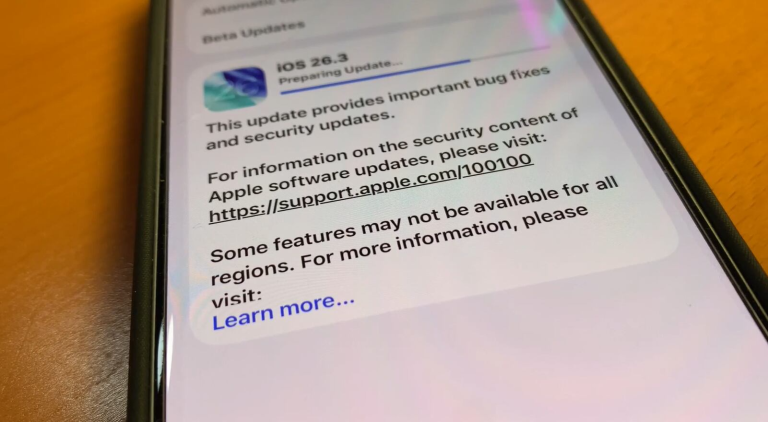
In the ever-evolving realm of technology, software updates have become a cornerstone for ensuring device efficiency and security. Yet, users of older devices often encounter a plethora of challenges that make installing these updates not just inconvenient but sometimes impossible. The intricate nature of modern software can lead to feelings of frustration and confusion for those using legacy systems.
Compatibility Issues
Compatibility issues are a primary concern for users with older hardware. As software developers innovate and release new features, the demands placed on the device’s hardware increase. For example, a computer designed five years ago may struggle to run applications that require more powerful processors or additional memory that older systems lack. Features like artificial intelligence, 3D graphics, and cloud integration might be core components of new software, but they often leave older devices unable to cope with these advancements.
Performance Degradation
Another significant factor is performance degradation. An older device, initially fast and responsive, may find itself lagging after several updates. This slowdown can stem from various reasons, such as background processes consuming more resources than the hardware can afford to allocate. Users might experience delays when opening apps or multitasking, leading to a frustrating user experience. A common example is seen with smartphones; as operating systems are updated to support new apps and features, older models may exhibit noticeably reduced speed and efficiency.
Security Vulnerabilities
Perhaps the most alarming consequence of not keeping up with updates is the increased risk of security vulnerabilities. Cybercriminals often exploit weaknesses in outdated software to infiltrate devices, steal personal information, or install malware. Furthermore, companies discontinue support for older systems, leaving them exposed to threats. For instance, the end of security updates for Windows 7 in January 2020 left many users with devices vulnerable to attacks. This highlights the importance of regular updates to safeguard personal data.
Strategies for Managing Updates
Despite these challenges, there are several strategies to manage software updates effectively. Users can consider upgrading to lightweight alternatives for applications that require significant resources. For instance, opting for simpler text editors instead of full-featured word processors can dramatically reduce the strain on older systems. Regular maintenance, such as cleaning devices to remove unnecessary files and applications, can also improve performance. This includes managing storage space and ensuring that system resources are not being overtaxed.
Finally, exploring community forums can provide users with valuable tips and insights. Many individuals face similar challenges, and sharing solutions can foster a sense of community while empowering users to take charge of their device’s performance. Websites like Reddit or tech-specific forums often serve as excellent platforms for finding user-driven solutions and advice.
As software development progresses, it is crucial for users to adapt their approaches towards managing updates on older devices. By staying informed, taking proactive measures, and leveraging resources, users can create a smoother path for navigating the complexities of technology.
LEARN MORE: Click here to enhance your usability testing skills
Understanding the Challenges of Software Updates
The world of technology is in a perpetual state of motion, with software updates being vital to enhance functionality and extend the lifespan of devices. However, users with older devices frequently find themselves navigating through a maze of complications when attempting to keep their systems updated. These challenges stem from various factors that can impede not only the update process but also the overall usability and security of the device.
Network Limitations
One of the less obvious hurdles users face is network limitations. Older devices may lack the necessary hardware to support high-speed internet connections, resulting in lengthy download times for updates. This slow connectivity can become a significant barrier, particularly when updates are large in size. Users on slower networks, such as rural or urban areas with limited service options, may find it nearly impossible to obtain critical updates. This can lead to a regrettable cycle of deferred updates, further jeopardizing device performance and security.
Complex Update Procedures
Many users often struggle with the complexity of update procedures. For older devices, the update process may not be as intuitive as it is on newer models. This lack of user-friendly interfaces can make it challenging for the average user to follow intricate guidelines. Whether it’s navigating through multiple menus or understanding cryptic error messages, the frustration can overshadow the urgency of updating to maintain device functionality. Additionally, manufacturers sometimes do not provide clear instructions specific to older devices, leaving users scrambling for answers.
Insufficient Storage Space
Another roadblock encountered by users is insufficient storage space. As software becomes more complex, the size of required updates has increased dramatically. Older devices, often equipped with limited storage capacity, may struggle to accommodate these updates. Users might find themselves faced with the choice of deleting important files or even additional applications to make room for essential updates. This leads to another conundrum: deciding what to keep versus what needs to be sacrificed for the sake of maintaining a device that may be due for retirement.
Understanding Potential Solutions
To navigate these challenges effectively, users can explore various strategies:
- Utilize External Storage: Investing in external storage options such as USB drives or cloud services can alleviate storage issues, providing additional space for updates.
- Seek Professional Assistance: Users uncertain about navigating the update process could benefit from consulting tech professionals or local repair shops.
- Opt for Incremental Updates: Prioritizing incremental updates when available can ease the burden on older devices instead of overwhelming them with large comprehensive updates.
By adopting these strategies and staying informed on developments in technology, users can tackle the challenges associated with software updates on old devices. This proactive approach can help ensure that devices continue to function effectively while minimizing security risks.
| Challenges | Solutions |
|---|---|
| Compatibility Issues | Use Lightweight Alternatives: Explore applications designed for older hardware. |
| Performance Degradation | Regular Maintenance: Clean device storage and regularly uninstall unused apps. |
The challenges presented by software updates on old devices can indeed be daunting. One of the major challenges is the issue of compatibility. As software evolves, it often does not play well with outdated hardware. Users often find their once-relatable devices lagging behind after an update. Fortunately, a useful solution is to explore lightweight alternatives to popular applications, which are specifically designed for older hardware, allowing users to continue enjoying necessary features without significant slowdowns.Another significant challenge is performance degradation. As newer software demands more resources, older devices tend to struggle, leading to slower operation. Yet, implementing regular maintenance practices like device storage cleaning and uninstalling apps that are no longer in use can help maintain a satisfactory user experience. This approach not only mitigates issues with updates but also maximizes the remaining lifespan of older devices, enabling users to overcome the hurdles of rapid technological advancement.
DON’T MISS: Click here for expert tips on usability testing
Navigating Compatibility Issues and Software Risks
As users engage with their aging devices, compatibility issues emerge as an increasingly daunting challenge. Each software update often introduces enhanced features and security patches, but these enhancements may not necessarily align with older hardware capabilities. This dissonance can lead to performance degradation, frequent crashes, or in worst-case scenarios, total device failure. A prime example is the frequent incompatibility experienced between updated operating systems and older hardware, resulting in systems that are sluggish and less responsive.
Security Vulnerabilities
Another pressing concern surrounding the software update dilemma for older devices is security vulnerabilities. As manufacturers release new updates, they often prioritize significant improvements for the latest models, leaving older ones potentially overlooked. This discrepancy leaves older devices vulnerable to various cyber threats. The absence of essential security patches can create opportunities for malicious software to exploit system weaknesses. According to reports by cybersecurity experts, legacy systems — those that have not been updated in some time — are often targeted by hackers who exploit their outdated security measures.
Operating System Support Lifespan
The operating system support lifespan is another critical element affecting older devices. Most manufacturers provide a limited window of support—generally around five to seven years—after which users are essentially left to fend for themselves. Once a device surpasses this time frame, users not only become ineligible for crucial updates but also risk losing compatibility with newer applications. Many software developers are inclined to follow the trajectory of current operating systems, which results in older devices being pushed out of the loop, rendering them less functional over time.
Proactively Managing Updates and Device Longevity
Fortunately, users can employ several strategies to help mitigate these challenges:
- Regular Maintenance: Regular maintenance can improve device performance and longevity. Cleaning up unnecessary files, uninstalling unused applications, and ensuring the device operates with optimal battery health can prolong its life.
- Exploring Alternate Operating Systems: For tech-savvy individuals, exploring alternate operating systems can provide a more lightweight alternative tailored for older hardware. Options like Linux have lightweight distributions that can breathe new life into aging devices.
- Patching Vulnerabilities Independently: Users can actively seek out third-party software patches or updates that may enhance security without relying on official channels. However, this approach should be pursued cautiously, as it can introduce additional risks if proper research is not conducted.
Through a combination of proactive strategies and diligent maintenance efforts, users can overcome compatibility issues, secure their devices against vulnerabilities, and improve the overall usability of their older technology.
DIVE DEEPER: Click here for essential tips on usability testing
Addressing the Issues of Software Updates on Older Devices
In today’s fast-paced technological landscape, the challenges associated with software updates on old devices are both multifaceted and increasingly significant. Users navigating the perilous waters of compatibility issues, security vulnerabilities, and the daunting end of operating system support must remain vigilant. These hurdles highlight not only the importance of continuous software improvements but also the stark reality that older hardware often becomes collateral damage in the race for innovation.
However, by implementing proactive measures such as regular device maintenance, exploring alternative operating systems, and seeking independent security patches, users can extend the lifespan and usability of their seasoned devices. More than just an exploration into technicalities, this journey reflects a broader societal conversation about sustainability and resourcefulness—qualities that are essential in an era characterized by rapid obsolescence.
As we continue to embrace the digital age, tackling the challenges of software updates on older devices becomes increasingly essential for both personal and community-wide security. By fostering a culture of innovation, resourcefulness, and education, we can ensure that our aging technology does not become obsolete overnight, providing users with the tools necessary to enjoy their devices for as long as possible. This, in turn, contributes to a more sustainable and efficient technological future that values both progress and preservation.